6 posts tagged with "announcements"

View All Tags

Salesforce has announced several certificate-related changes in 2026 that may generate questions from customers. enosix has reviewed these changes and assessed the impact across our product line. No customer-facing disruptions have been observed to date, and our architecture minimizes exposure to these changes. Below is a summary of each change and how it relates to enosix products.


1. Root Certificate Transition to DigiCert Global Root G2 (Effective February 5, 2026)

Salesforce has transitioned to issuing certificates chained from the DigiCert Global Root G2. Any certificate issued by Salesforce after February 5, 2026 will be chained to this new root in most environments. Salesforce recommends that organizations adopt the Mozilla Root Certificate Set to future-proof their trust stores.

Impact on enosix Products

  • Salesforce Apps (Surface, Transact, Commerce, SDK, Sync): enosix integrations with SAP are built on Named Credentials and Callouts, not direct API client connections. Salesforce manages the outbound TLS trust chain for Named Credential callouts, so no customer action is required for these products. Self-signed certificates and CA-signed certificates that you upload to your org are not in scope for this change.

  • enosix Link: The enosix Link appliance has been patched to include the latest root certificate updates, including DigiCert Global Root G2. Customers should review the Link release announcements and ensure they are running the latest version. Customers not using the stable (automatic update) channel should update to the latest release to ensure continued compatibility.

  • enosix Connect: The enosix Connect appliance has been patched to support the latest root certificate updates. Customers should review the Connect release announcements and ensure they are running the latest version. Customers not using the stable (automatic update) channel should update to the latest release to ensure continued compatibility.


2. Deprecation of Dual-use Certificates (Effective June 15, 2026)

Effective June 15, 2026, Chrome will mandate a strict separation between server and client authentication certificates ("dual-use" ban). This impacts customers using mutual TLS (mTLS) with Salesforce, requiring that client certificates are not sourced from the same public roots used for website trust.

Impact on enosix Products

enosix products do not use mTLS for connectivity between Salesforce and SAP. This change has no impact on enosix integrations. Customers who have implemented custom mTLS configurations outside of enosix products should review the Salesforce-supported CAs for Client Auth EKUs and audit their mTLS usage independently.


3. Certificate Lifespan Reductions (Starting March 15, 2026)

To align with industry standards, Salesforce is reducing maximum TLS server certificate lifespans in phases:

DateMaximum Lifespan
March 15, 2026200 days
March 15, 2027100 days
March 15, 202947 days

This means certificates will be renewed more frequently. Some CA vendors have already begun issuing 200-day certificates.

Impact on enosix Products

  • Salesforce Apps (Surface, Transact, Commerce, SDK, Sync): Certificate renewal is managed entirely by Salesforce for Named Credential connections. No customer action is required.

  • enosix Link & Connect: Appliance updates include support for more frequent certificate rotations. Customers should stay current on the latest releases to ensure their appliances handle renewed certificates seamlessly. Customers not using the stable (automatic update) channel should regularly check for and apply the latest updates.


Summary

ChangeEffective Dateenosix ImpactCustomer Action
Root Certificate → DigiCert Global Root G2Feb 5, 2026No disruption observedLink & Connect: update to latest release if not on stable channel
Dual-use Certificate Ban (mTLS)June 15, 2026No impact (enosix does not use mTLS)None for enosix products
Certificate Lifespan → 200 daysMarch 15, 2026No impact for Named Credential integrationsLink & Connect: stay current on releases

Additional Resources

For any questions or support, please contact the enosix team.
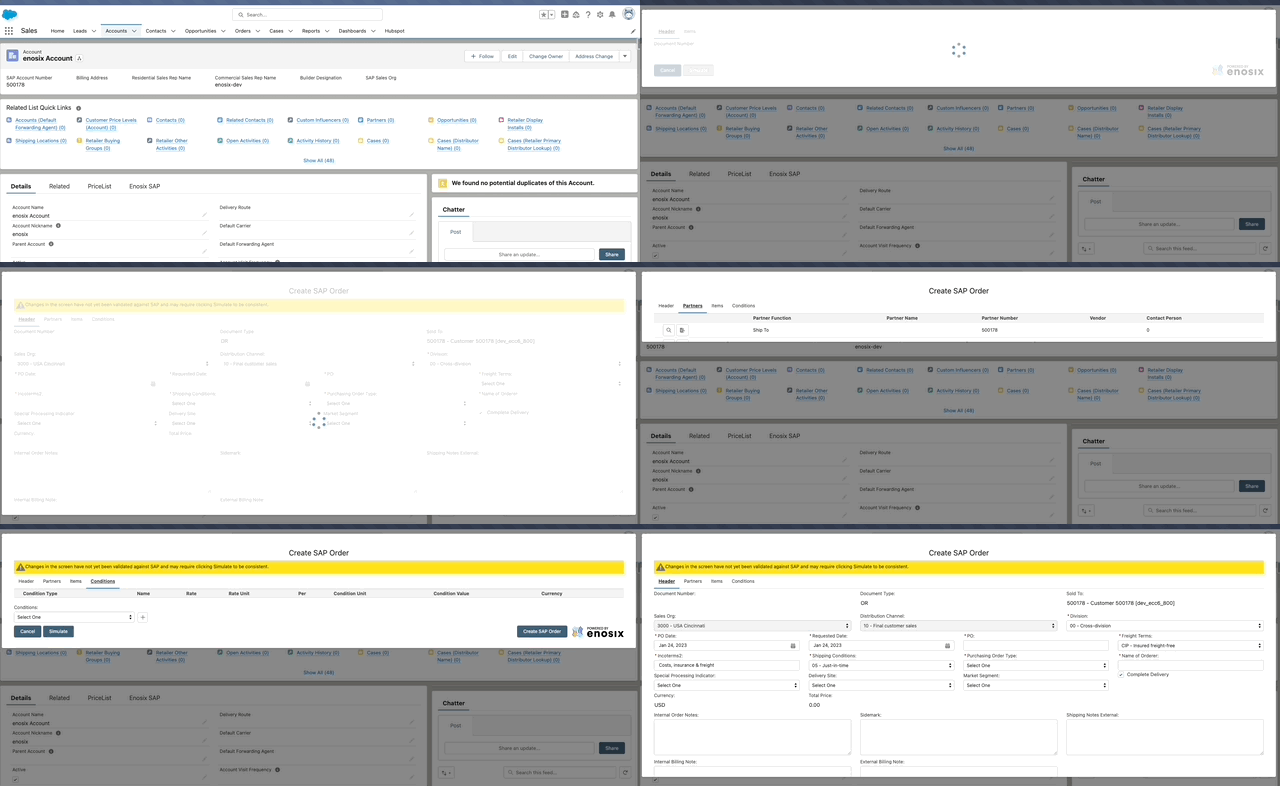
UPDATE: As part of the 📣 Salesforce Winter Release '23 📣 Salesforce is rolling out to select orgs, a new version of the Flow Runtime (v3). Because of this, we are receiving reports where users are seeing the visible height of the Sales Document Create screen in enosix Transact cut in half, when navigating tabs.

ISSUE: 🔖 The issue is ONLY happening when launching the Screen Flow from a sObject Quick Action.

EXAMPLE: 👀

image1

ScreenFlow Height Resize Issue

RESOLUTION: 🎫 If you are experiencing this issue, please submit a support ticket through our Support Portal 👉 https://go.enosix.com/support. We will then schedule a small patch to be applied to your Salesforce org to fix this issue.

✨ ReleaseNotes has a New Look just for you! Take a look! 👀

The enosix logo on the top left will take you to our website.

1️⃣ WHAT'S NEW is our ReleaseNotes homepage. What that means is this page will list ALL releases.

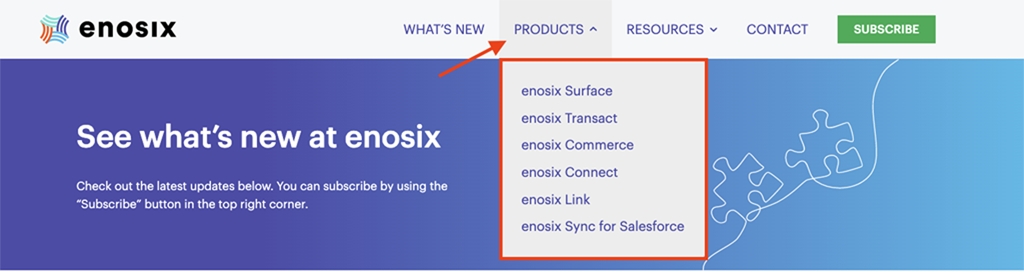
2️⃣ PRODUCTS includes all enosix products, and clicking on a product will take you to all the releases for that product.

Products Tab

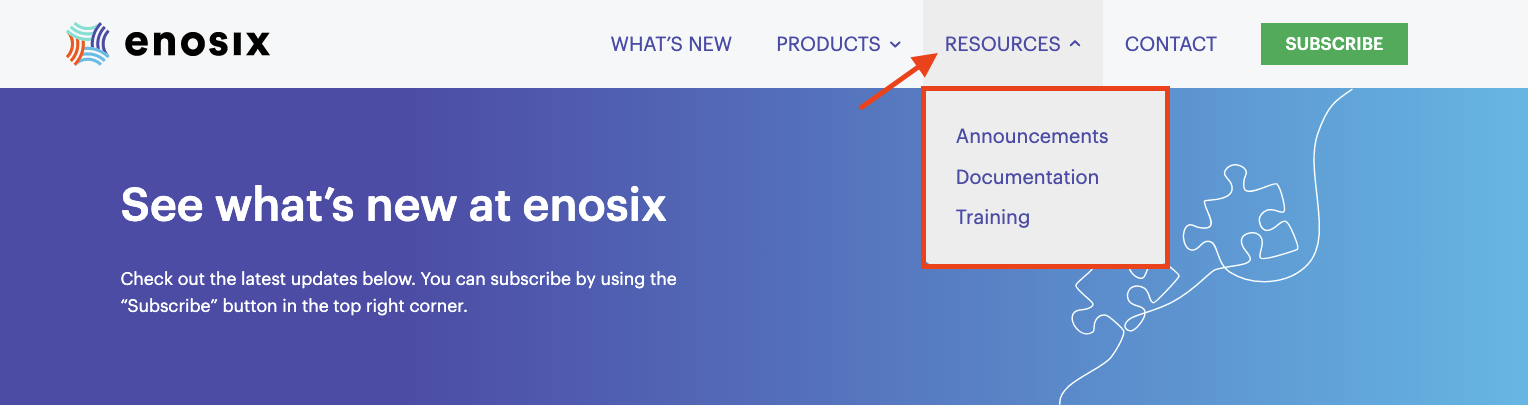
3️⃣ RESOURCES include Announcements, Documentation, and Training options.

  • The Announcements tab is for new product announcements and other updates from enosix.
  • The Documentation will take you to our documentation page.
  • The Training page is coming soon for you.

Resources Tab

Don't forget to click the Subscribe button (to subscribe to everything) if you haven't done so.

Screen Shot 2022-06-27 at 7

💬 We want to hear from you!

Hello All!

📣 enosix is announcing our new solution, enosix Sync for Salesforce 📣

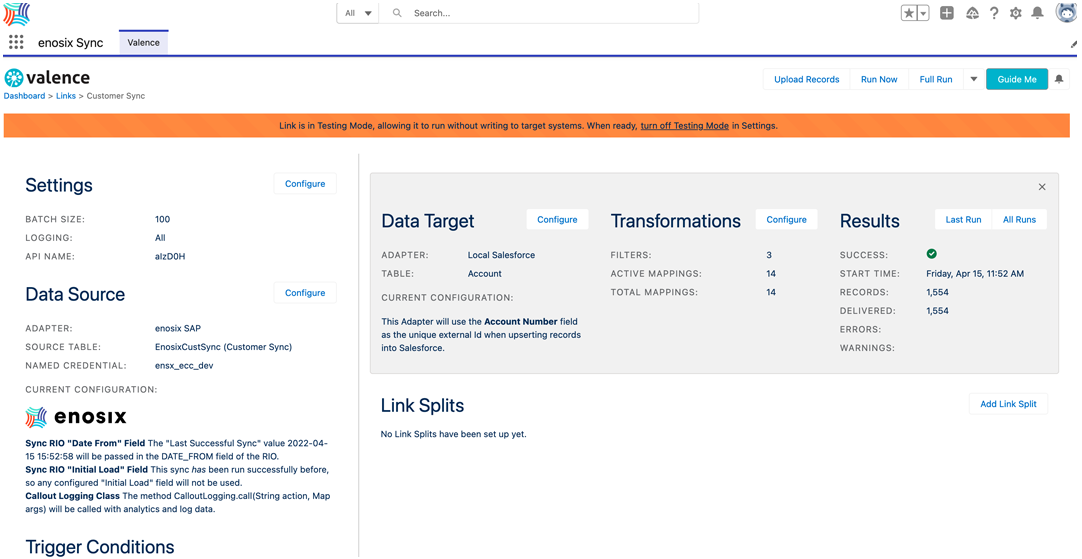
enosix Sync for Salesforce provides a Salesforce native app with the ability to replicate data from SAP to Salesforce.

1️⃣ Data is copied (replicated) from SAP to a Salesforce sObject on a daily or hourly schedule

2️⃣ Synced data can be used in Salesforce Reports, Formula fields since it is copied to Salesforce

Note: Depending on your batch schedule, data may be out of date. For real-time data use our Surface App.

enosix Sync Customer Sync

FEATURES:

  • Admin friendly interface for configuring synchronization jobs from SAP to Salesforce

  • Source date from the library of enosix Sync Rapid Integration Objects

  • Target any native or custom Salesforce sObjects

  • Built-in data transformation with field to field mapping

  • Built in job scheduling

  • Built in logging and error reporting

  • Syncs can be run in development mode for testing without data updates

  • enosix SAP adapter support for:

    • Efficient initial and delta syncing based on last execution date
    • Support for specifying the language used for localized description fields

App Launcher - enosix Sync

👉 The enosix Sync app provides the Valence syncing framework and enosix adapter for SAP.

  • [Feature]: Added support for sap-language parameter to source localized data from SAP
  • [Feature]: Added support for sap-client parameter to source data from the non-default data client in SAP
  • [Feature]: Add support for CID to enable specifying which enosix SAP framework calls are invoked
  • [Feature]: Add support for scoped paging and batch/page size limits to allow Valence to properly plan the number of scopes needed to efficiently process data
  • [Feature]: Add support for specifying a System.Callable for logging HTTP callout information for debugging purposes.
  • [Feature]: Add support for specifying Last Queried Date and Initial Load fields to enable enosix SAP framework optimizations to occur for full and partial syncs.

Announced on Dec 10th, 2021 the Zero Day Log4j vulnerability CVE-2021-44228, is affecting systems worldwide. enosix has reviewed its systems and has yet to detect any platforms, apps, or services that are affected by this vulnerability.

Salesforce is conducting its own analysis of its systems. Any Salesforce apps provided by enosix (Surface, Transact, Commerce, CPQ) are not using log4j and are not affected. Salesforce will provide updates to the Salesforce platform, if needed.

The enosix connect platform does not utilize java or the log4j libraries and is not affected. Your IT department should review any other apps you are running in the SAP BTP platform, see SAP Note 3130476

enosix Link does not utilize java or the log4j libraries and is not affected. SAP Note 3130868 details that none of the SAP Cloud Connector versions contain the affected log4j-core and are not affected.

enosix will continue to review our systems and provide assistance. We advise that all computer systems operators review their systems that may be affected and take the recommend steps to patch any affected software.