The Shopping Process
As customers navigate your ecommerce site, they can search for products, add products to their shopping cart, and later purchase those products during the checkout process.
Product Detail Screen
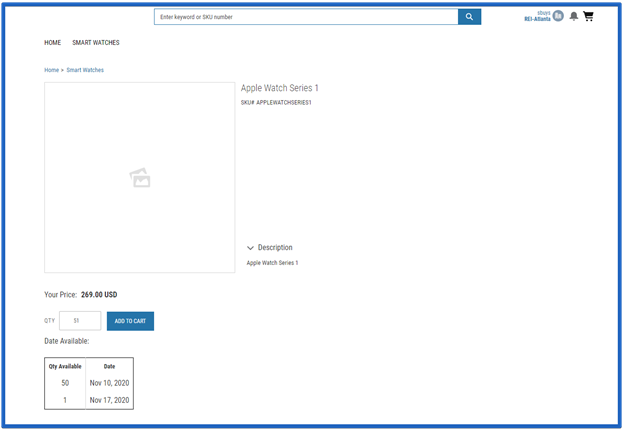
Each Product Detail screen provides pricing information (including tiered pricing if it's enabled) and other details (a description, specifications, owner’s manuals, etc.) for a particular product. The item price on the Product Detail screen takes into account item quantity (including items that are already in the cart) and pricing for the current customer based on existing SAP business logic. Product pricing occurs in real time, so any price changes or discounts created up to the moment that a user opens the Product Detail screen are reflected immediately.
Your ecommerce site can incorporate SAP’s available to promise (ATP) logic to limit the quantity of an item that a customer can order (example: up to 50 items per order). When a customer requests more than the item limit, the Product Detail screen uses the ATP date to display a list of how many items are available now and for future dates. As your customer changes the item’s quantity, the price and the ATP date adjust automatically. Use the Validate Confirmed Quantity setting in the Store Configuration Settings to enable the ATP logic in your ecommerce site.
View the Cart
Before your customers complete their checkout process, they can choose to view their shopping cart to see which items they’ve already selected for purchase. They can see the various items they’ve selected, the quantity and pricing for each item, plus the total price for all of the items that are currently in their cart. When your customers view their cart’s contents, their order is simulated once more in SAP so any additional price changes or discounts that result from the total collection of items display in the cart.
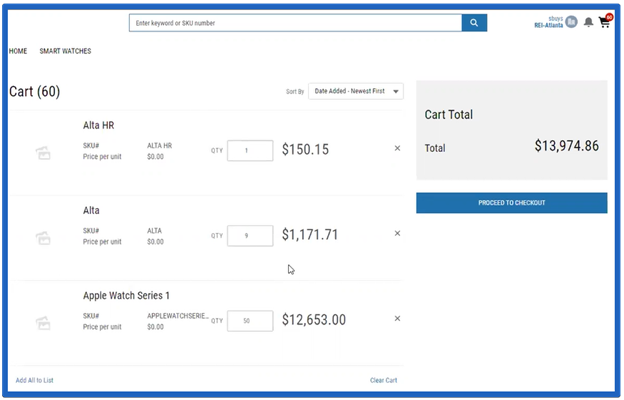
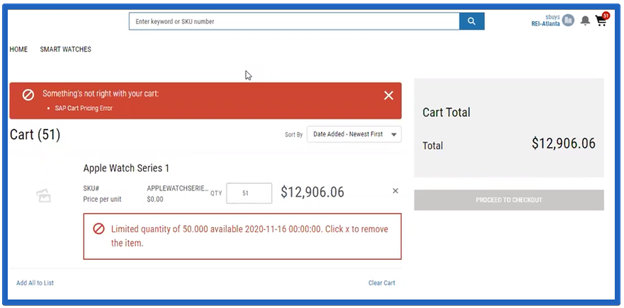
While viewing their cart, your customers can modify the quantity for each item in their cart. SAP’s ATP logic is enforced throughout your ecommerce site. If your customers try to increase an item’s quantity beyond the ATP limit, they'll be unable to check out with the over limit quantity, and an error message will display (like below) to indicate that they selected an invalid quantity.
After they review and update their cart’s contents, your customers can Proceed To Checkout or continue shopping.